
Modern homes depend on technology, yet the visual clutter of cables, chargers, and devices can quickly undermine even the most carefully designed space. From tangled power strips behind media consoles to phone chargers sprawled across kitchen counters, tech accessories tend to accumulate in plain sight. The challenge is not simply hiding them, but doing so in a way that preserves accessibility, functionality, and style. With a thoughtful approach, it is entirely possible to maintain a clean, elegant environment without sacrificing convenience.
TLDR: You can hide cables and tech clutter without compromising style by integrating smart storage, cable management systems, and furniture designed for concealed wiring. Focus on planning before placement, using built-in pathways, and consolidating charging areas. Prioritize safety and accessibility while maintaining clean visual lines. Small adjustments—like cord sleeves, decorative boxes, and wall-mounted solutions—make a significant difference.
Why Cable Clutter Disrupts Design
Loose cables and exposed chargers create more than just physical disorder. They interrupt clean lines, draw attention away from focal points, and add visual noise to carefully planned interiors. In psychological terms, visible clutter can subtly increase stress and reduce the sense of calm within a room.
From a safety perspective, unmanaged cords also present trip hazards, dust accumulation, and overheating risks. Therefore, addressing tech clutter is not only an aesthetic choice but also a practical and responsible one.
Start With a Strategic Plan
Before purchasing any cable management solution, conduct an audit of your space:
- Identify essential devices: Determine what must remain plugged in at all times.
- Eliminate redundancies: Remove outdated chargers and unused cables.
- Group devices logically: Cluster entertainment devices, office equipment, and charging stations.
This preparatory step reduces clutter at its source. Often, up to 30% of visible cables are unnecessary or rarely used.
Create Centralized Charging Stations
One of the most effective ways to eliminate scattered chargers is to establish a designated charging hub. Instead of plugging devices into outlets throughout the house, consolidate them into a controlled area.
Effective charging stations typically include:
- A drawer with an internal power strip
- A decorative box that conceals surge protectors
- A built-in cabinet with ventilation holes
- Labelled cables for easy identification

When contained within a drawer or box, devices remain accessible yet invisible. For households with children, this also reduces exposure to plugs and electrical connections. Always ensure adequate airflow to prevent overheating.
Use Cable Management Accessories Thoughtfully
High-quality cable management tools can dramatically transform a space. However, they should be selected carefully to complement the room’s aesthetic.
Recommended solutions include:
- Cable sleeves: Fabric or neoprene sleeves bundle multiple cords into a single streamlined line.
- Cord clips: Small adhesive holders secure cables along desks or baseboards.
- Under-desk trays: Mounted beneath desks, these hold power strips out of sight.
- Cable raceways: Paintable channels that run along walls to conceal wiring.
The key is coordination. Black sleeves may blend with dark furniture, while white raceways disappear along pale walls. Choose finishes deliberately to avoid drawing attention to the very elements you aim to conceal.
Invest in Furniture Designed for Concealment
Modern furniture increasingly incorporates cable management features. Media consoles with back panels, desks with built-in wire grommets, and nightstands with discreet power outlets are particularly valuable.
When selecting furniture, consider:
- Hidden compartments for routers and modems
- Rear openings for cable passage
- Ventilation space for heat-producing electronics
- Adjustable shelves to accommodate varying device sizes
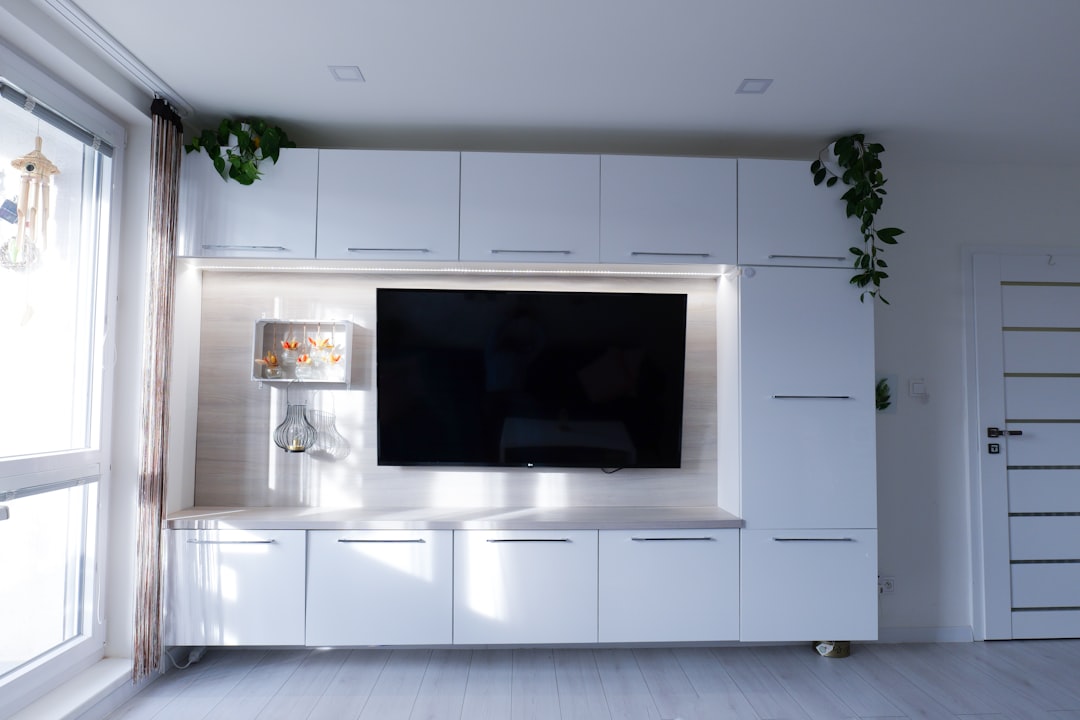
A wall-mounted media console can dramatically reduce visible cabling by elevating devices and concealing wiring behind the wall. Professional installation may be required for in-wall cable routing, particularly when relocating electrical outlets.
Conceal Cables Behind Walls When Possible
For a truly seamless appearance, in-wall cable management offers the cleanest result. This method involves routing television and device cables behind drywall, leaving no visible wires between the screen and power source.
Important considerations include:
- Compliance with local electrical codes
- Use of rated in-wall cabling
- Professional installation for complex setups
While this solution requires greater investment upfront, it yields long-term aesthetic benefits and enhances property value.
Camouflage, Don’t Just Hide
When complete concealment is impractical, strategic camouflage becomes essential. For example, cords running along a wooden floor may blend when matched to the floor tone. Likewise, routing cables along architectural features such as baseboards or moldings reduces visual disruption.
Decorative elements can also assist:
- Woven baskets concealing power strips
- Decorative boxes for routers
- Plants placed to obscure outlets

These solutions maintain design harmony rather than creating an obvious attempt at concealment.
Minimize Surface-Level Charging
Kitchens, bedrooms, and living areas often accumulate visible chargers simply because outlets are convenient. To reduce surface clutter:
- Install outlets with integrated USB ports
- Use wireless charging pads embedded in furniture
- Adopt multi-device charging docks
Wireless charging technology has matured significantly and eliminates multiple visible cords. When integrated into nightstands or desks, it preserves functionality without compromising aesthetics.
Organize Peripheral Technology
Beyond cables, tech clutter includes remotes, headphones, gaming controllers, and speakers. Without systematic storage, these items quickly create disorder.
Effective solutions include:
- Dedicated drawers with compartment dividers
- Wall hooks inside cabinets for headphones
- Remote control trays on side tables
- Vertical stands for gaming headsets and controllers
Containing these accessories reinforces the overall sense of control and intentional design.
Maintain Accessibility and Safety
In the effort to conceal cables, accessibility should never be sacrificed. Devices requiring regular resets, such as routers, must remain reachable. Power strips should not be fully sealed within airtight containers. Avoid overloading outlets, and consider surge protection for valuable electronics.
Elegant concealment must coexist with responsible usage. A hidden hazard is more dangerous than visible clutter.
Develop a Habit of Ongoing Maintenance
Cable management is not a one-time project. As technology evolves, new devices enter the home. Without periodic review, clutter gradually returns.
Establish simple maintenance practices:
- Review cables every six months
- Label newly added wires immediately
- Store unused chargers in a dedicated container
- Discard damaged or obsolete cords responsibly
Routine reassessment prevents gradual disorder.
The Balance Between Technology and Design
Technology is integral to modern living, yet its infrastructure need not dominate interior aesthetics. By planning placements carefully, investing in concealment-friendly furniture, and applying discreet management tools, it is possible to maintain a refined, uncluttered environment.
Ultimately, the goal is not to pretend technology does not exist, but to integrate it harmoniously. A well-organized system should feel intuitive and invisible—supporting daily life without commanding visual attention.
In well-designed spaces, nothing appears accidental. Cables follow intentional paths, chargers have designated homes, and surfaces remain clear for living rather than wiring. With disciplined organization and thoughtful design choices, technology can coexist with elegance—and your home can reflect both sophistication and functionality.

